See your AI teammate in action now
Ready to make support faster, kinder, easier and help customers feel good about choosing you?
PS: Sales improves too...
No credit card required
14 days free trial
DIY or Guided setup
Ready to make support faster, kinder, easier and help customers feel good about choosing you?
PS: Sales improves too...
No credit card required
14 days free trial
DIY or Guided setup
Learn how to automate customer service for scalable support, covering journey mapping, tool selection, CRM integrations, human handoffs, and KPI tracking.
Manish Keswani
Summary by MagicalCX AI
Human-first AI customer service automation can cut support costs by up to 30% while resolving up to 80% of routine inquiries instantly, as long as it integrates with your CRM and hands off complex or frustrated customers to human agents.
To really nail customer service automation, you have to think beyond just plugging in new tech. It’s about blending the right tools with a truly human-first strategy. The goal isn't to replace your team, but to empower them.
Imagine your best agents no longer having to answer "Where's my order?" or "How do I reset my password?" a dozen times a day. Instead, they’re freed up to tackle the tricky, high-stakes issues where their expertise actually makes a difference. For example, they could spend their time helping a high-value customer troubleshoot a complex software bug or advising a new user on the best way to get started with your product. That’s the sweet spot—boosting efficiency while genuinely making customers happier.
Let’s be clear: customer service automation today is a world away from the clunky, scripted bots that used to drive everyone crazy. Modern platforms use sophisticated AI to deliver helpful, context-aware answers that actually solve problems on the spot.
The secret is finding the right balance. You need to map out your customer's journey and pinpoint which moments are routine and which require a real human connection. When you get this right, you create a seamless system where technology handles the predictable, and your team handles the personal. A practical example would be automating the initial "order status" query but immediately routing the conversation to a human agent if the customer expresses frustration about a delay.
For any D2C or SaaS company, the wins from automation are tangible and immediate. One of the biggest is being able to manage a huge volume of customer questions without constantly having to hire more people. This is especially true when it comes to automating repetitive tasks, which lets your agents focus on conversations that build loyalty and solve complex problems.
This strategic shift leads to some powerful outcomes:
The numbers don't lie. What if you could cut your customer service costs by 30% while simultaneously improving customer satisfaction? That’s not a hypothetical—it’s what companies are achieving with AI-powered automation.
In fact, a recent study found that 95% of businesses using AI in their customer service have seen major savings in both time and money. It’s no surprise the global AI customer service market is expected to rocket to $47.8 billion by 2030.
For SaaS and subscription-based businesses, this is a game-changer. It means you can scale your support as you grow, without your headcount costs spiraling out of control. Automation handles the high-volume, predictable inquiries, freeing up your experts to focus on the unique challenges that keep customers loyal.
We've come a long way from basic FAQ bots. Today’s automation is designed to be context-aware. It remembers past conversations and knows a customer’s history, allowing for truly personal and helpful interactions. These systems can intelligently decide when to offer help, when to suggest a product, and—most importantly—when to seamlessly hand off a conversation to a human.
Think about how this plays out for an e-commerce brand:
That single interaction transforms a potential complaint into a moment that strengthens brand loyalty. This is about shifting from a reactive support model to one that’s proactive and empathetic. To see more examples, check out our deep dive into the benefits of AI in customer service.
Moving to an automated customer service model isn't as simple as flipping a switch. It's a strategic build-out, piece by piece, designed to create a system that handles the repetitive noise while keeping the human touch that your customers value. The whole process starts with a simple, foundational truth: you can't automate what you don't understand.
Before you even think about tools or platforms, you need to get intimately familiar with your customer's journey. Map out every single touchpoint, from the moment they first hear about you to their post-purchase support questions. This isn't just a marketing exercise—it's a diagnostic tool that reveals every point of friction and frustration.
Where do people get stuck? What questions clog up your support inbox day after day? A practical first step is to export your last 1,000 support tickets and categorize them by topic. These high-volume, low-complexity queries are your low-hanging fruit for automation.
Jumping into automation without a solid foundation is a recipe for disaster. You need the right data, clear processes, and a team that’s prepared for the shift. Before you go any further, it's worth taking a hard look in the mirror.
This checklist will help you gauge your readiness. Be honest with your answers—it will save you a lot of headaches down the road.
Use this checklist to assess if your business is ready to implement a customer service automation strategy, covering data, processes, and team readiness.
| Area of Assessment | Key Question to Ask | What Success Looks Like |
|---|---|---|
| Data & Systems | Is our customer data (purchase history, support tickets) centralized and accessible via API? | Your CRM or data warehouse is a single source of truth, not a collection of disconnected spreadsheets. |
| Process Clarity | Are our most common support processes (e.g., returns, refunds) well-documented and standardized? | An agent could follow a clear, step-by-step guide to resolve the top 5-10 most frequent issues. |
| Team Skills | Does our team have the skills to manage, analyze, and improve an automated system? | You have people who are comfortable looking at analytics and suggesting process improvements. |
| KPIs & Measurement | Do we know our current baseline metrics (e.g., first response time, cost per ticket)? | You have clear, measurable KPIs for your support team that you can use to benchmark success. |
| Customer Journey | Have we mapped out the key friction points where customers need the most help? | You have a visual map or document that identifies the most common hurdles in the customer experience. |
If you found yourself nodding along to the "What Success Looks Like" column, you're in a great position. If not, these are the areas you need to shore up before investing in any automation technology.
With a clear journey map in hand, it's time to dig into your support data. Get into your help desk, chat logs, and CRM notes to see what people are actually asking about. You’ll quickly discover that the 80/20 rule is in full effect—a small handful of issues are eating up most of your team’s time.
You’ll see the same things pop up again and again:
These are perfect candidates for automation. They are predictable, rules-based, and usually just require pulling data from another system. Automating them gives customers the instant answers they crave and frees your agents from soul-crushing repetition.
Not all automation is created equal. The trick is to match the right tool to the right problem. Think of it as a toolkit, not a single magic wand.
For dead-simple questions, a basic FAQ bot is your first line of defense. It can pull answers directly from your knowledge base to deflect the easiest tickets. For something more involved, like processing a return, a guided workflow is far more effective. It can walk the customer through each step, collect the info it needs, and even generate a shipping label on the spot.
When you need to understand context and intent, you'll need a more sophisticated AI assistant. These bots use natural language processing (NLP) to figure out what a customer really means, allowing for more complex, multi-turn conversations that feel surprisingly human. For example, if a customer says, "My package never came," the NLP bot understands this is an "order status" query and initiates the tracking lookup workflow.
Pro Tip: Don't look for one tool that does everything. The best automation strategies layer different tools together—a simple bot for simple questions, a workflow for processes, and an AI assistant for more complex needs.
Here’s a non-negotiable rule: your automation needs access to data. Without it, your bots are flying blind. That’s why integrating your automation platform with your Customer Relationship Management (CRM) system like Salesforce or HubSpot is an absolute must.
This connection is what turns a generic, robotic interaction into a genuinely helpful one. Instead of "How can I help you?", your bot can say, "Hi Sarah, I see your new headphones are scheduled for delivery today. Are you getting in touch about that order?"
That single piece of context changes everything. It shows you know who the customer is and why they might be reaching out, laying the groundwork for a proactive, personalized conversation. This unified view is critical for both your AI and your human agents.
The diagram below shows how this integrated approach creates a positive feedback loop, directly impacting your bottom line.
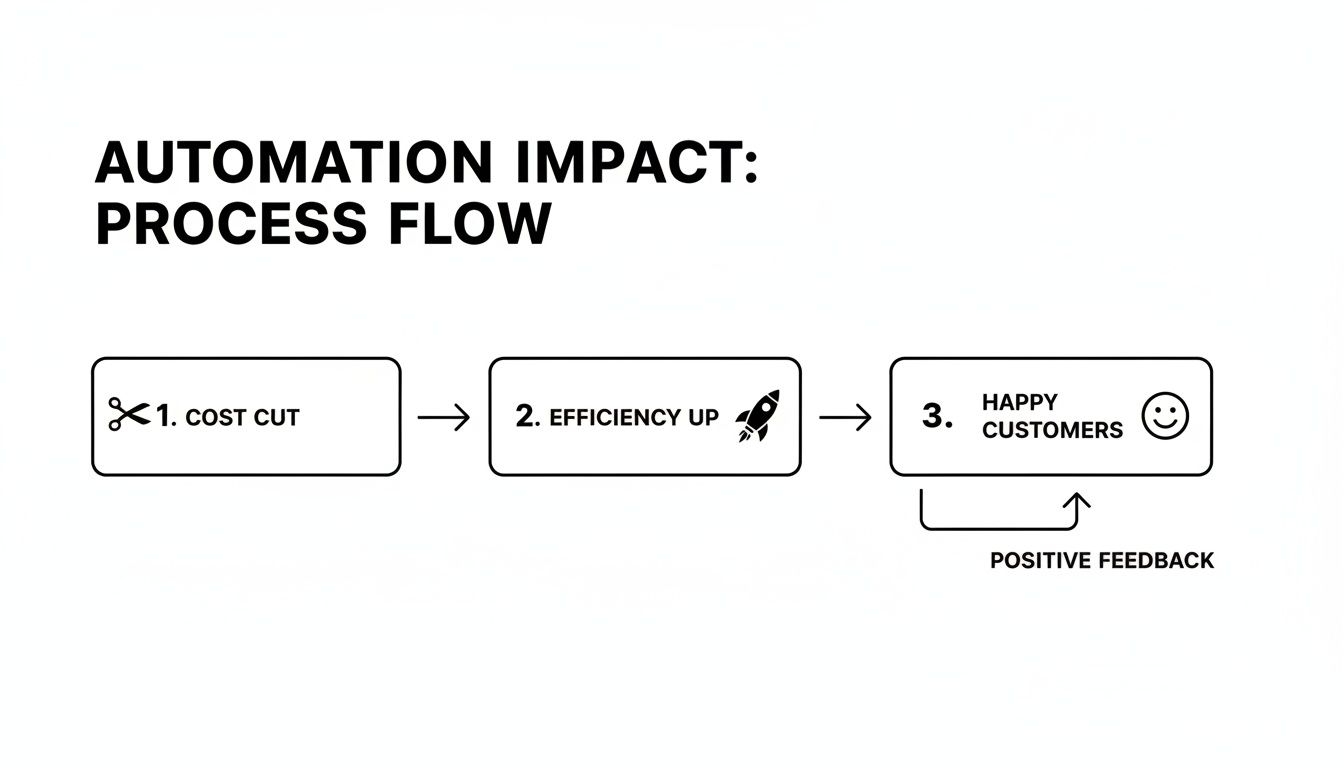
As you can see, strategic automation isn't just about cutting costs; it's about creating a cycle where operational wins lead directly to happier, more loyal customers.
Finally, we get to the most important part: designing the actual interactions. The best automation doesn’t feel like automation. It should feel like talking to your most helpful, patient, and knowledgeable team member.
Start by defining a clear personality and tone for your AI that matches your brand. Are you playful and casual? Or more buttoned-up and professional? Whatever it is, keep it consistent. A practical action here is to create a simple style guide for your bot, including approved phrases, emojis, and a "do not say" list.
Most importantly, you need to build smart and seamless human handoff rules. No AI can solve every problem, and it’s arrogant to think it can. Your system must be sharp enough to recognize when a customer is getting frustrated, when an issue is too complex, or when the situation just needs a real human.
For instance, if a customer uses words like "angry" or "useless," or if they ask the same question three times in a row, that's an immediate trigger to route them to a live agent. And when that handoff happens, the full conversation history must travel with it. Nothing makes a customer angrier than having to repeat themselves.
The financial incentive to get this right is huge. AI is projected to save the customer service industry $80 billion in agent labor costs by automating roughly 10% of interactions. For e-commerce and SaaS companies, this means a hybrid model where AI handles the simple stuff, cutting the cost per ticket by up to 40%. You can read more about these emerging trends in customer service and see how this blend of automation and human expertise is becoming the new standard for modern support.
Okay, you've got your automation blueprint ready. Now comes the exciting part: picking the technology that will actually do the work. The market is flooded with options, from simple chatbot builders to seriously sophisticated AI platforms, and telling them apart can be a real headache.
The secret is to ignore the flashy marketing and focus on what you genuinely need today, while keeping an eye on where you want to be tomorrow. A clear-eyed assessment of your needs, scale, and in-house skills will guide you to the right choice far better than any sales pitch.
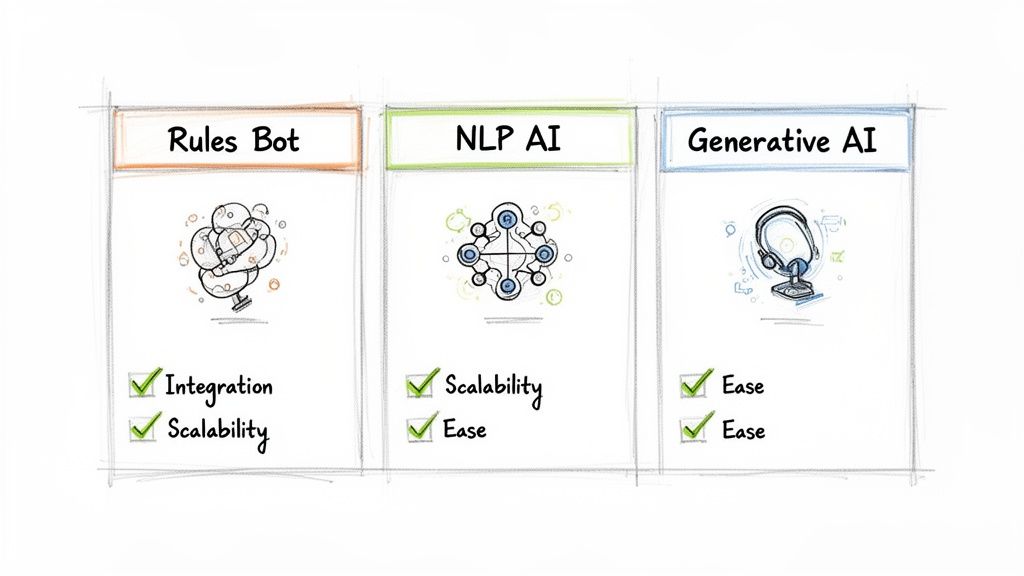
Before you even think about booking demos, let's create a quick scorecard. This will help you cut through the noise and evaluate every potential tool against the things that actually matter for your business.
The technology powering these tools isn't all the same, and the differences are huge. You wouldn't use a hammer to turn a screw, and the same logic applies here. Matching the tech to the complexity of your customer issues is the key to success.
The old idea of automation replacing humans is completely outdated. Modern AI is about supercharging support teams. In fact, 92% of businesses report better customer satisfaction from AI chatbots that can resolve up to 80% of queries instantly. This is why the AI customer service market is set to explode past $117 billion—AI agents are driving 50% cost reductions per interaction while simultaneously boosting CSAT scores. Find out more about the explosive growth of AI in customer service.
To help you decide, let's look at the different automation solutions you'll come across.
A detailed comparison of different automation technologies to help you choose the right fit for your business needs and scale.
| Solution Type | Best For | Key Features | Potential Limitations |
|---|---|---|---|
| Rules-Based Bots | Small businesses with highly predictable, repetitive questions (e.g., store hours, basic FAQs). | Follows a strict decision-tree logic. Simple to set up and manage for linear conversations. | Cannot understand context or user intent. Fails when users deviate from the script. |
| NLP-Driven AI | Growing businesses that need to understand customer intent and provide more flexible, contextual answers. | Uses Natural Language Processing to interpret what a customer is asking, even with typos or unusual phrasing. | Can handle complex conversations but may struggle with generating entirely new, human-like responses. |
| Generative AI | Larger or more complex businesses aiming for truly human-like, empathetic, and proactive conversations. | Creates new, dynamic responses in real time. Can summarize issues, show empathy, and handle nuanced queries. | Requires more sophisticated data integration and careful governance to ensure brand consistency and accuracy. |
Ultimately, this isn't about finding the "best" technology in a vacuum. It's about finding the best fit for your business model, your customers, and your team's capabilities right now.
A simple rules-based bot could be the perfect starting point to get your feet wet. On the other hand, if you're ready to deliver deeply personalized and empathetic experiences at scale, a generative AI platform like MagicalCX is built to handle that level of sophistication.
Let's be honest: automation fails spectacularly when it feels cold and robotic. We’ve all been trapped in those frustrating chatbot loops, and it’s enough to make anyone want to throw their phone. The real magic happens when you design an experience that's both incredibly efficient and genuinely human.
This is about more than just robotic scripts. It's about crafting automated conversations that feel like your best human agents—clear, helpful, and completely in tune with your brand's voice. The goal is to make customers feel seen and understood, even when they're interacting with an AI.

Your bot is a direct extension of your brand, so its personality can't be an afterthought. Is your brand quirky and fun? Professional and straight-to-the-point? Whatever it is, that voice needs to be baked into every automated interaction.
Think about the actual words and phrases your best agents use. Do they say "You're all set!" or "No problem"? Do they use emojis? These small details are the building blocks of your brand's conversational style. Applying them consistently helps build a recognizable and trustworthy automated assistant. An actionable step is to review your top-rated agent conversations and use their phrasing as a model for your bot's responses.
When you get this right, a customer gets a cohesive and authentic experience, whether they’re talking to a person or an AI.
There is nothing more infuriating for a customer than having to repeat themselves. Conversational memory is the key to solving this. It allows your AI to remember past interactions and context, just like a person would.
If a customer was just complaining about a shipping delay on your website and then sends an email five minutes later, your system should know. That continuity is what separates a good experience from a great one.
Here’s how it works in the real world:
This simple capability turns fragmented interactions into a single, ongoing conversation, making customers feel genuinely heard.
A study found that 81% of customers prefer companies that offer personalized experiences. Automation, fueled by the right data, doesn't get in the way of personalization—it supercharges it, letting you deliver relevant support at a scale a human team could never match.
The best automated experiences are proactive, not just reactive. When you integrate your automation platform with customer data sources like your CRM, you can start anticipating needs and solving problems before they even happen. If you're looking to get started, you might be interested in our guide on customer data integration best practices.
This connection allows your AI to shift from generic greetings to hyper-personalized, proactive engagement.
Real-World Scenario: Turning Frustration into Delight
Imagine a customer, already annoyed about a faulty product, opens a chat. Instead of a bland "How can I help?", an integrated AI does this:
In a single interaction, a moment of frustration becomes a moment of delight. The customer didn't have to explain their problem, prove their purchase, or fight for a fix. The system saw what was wrong and solved it, demonstrating a level of care that builds fierce loyalty. This is what human-centered automation is all about.
Once your new automated system is live, the real work begins. Getting it launched is the starting line, not the finish. The focus now shifts from implementation to a continuous cycle of measurement, learning, and refinement.
It’s easy to get fixated on a metric like ticket deflection, but that number doesn’t tell the whole story. Did the customer get a real solution, or did they just get frustrated and give up? True success isn’t about avoiding a support ticket; it’s about the quality of the resolution your customer receives.
To get a true feel for performance, you need to track a smart mix of KPIs that cover efficiency, customer sentiment, and the bottom line. It’s time to ditch the vanity metrics and focus on what really moves the needle for your customers.
Here are the core metrics I always recommend starting with:
When you track these three together—resolution, satisfaction, and effort—you get a much richer, more human-centric view of how your automation is actually performing.
Raw data is just noise. You need a way to turn those numbers into a clear story. Your automation platform’s dashboards and reports are your best friends here, helping you connect the dots between the metrics and the actual customer experience.
Look for patterns. Are certain questions always getting escalated to a human? Do users abandon a specific workflow at the same step every time? These friction points are gold—they give you a clear roadmap for what to fix next.
It's also crucial to analyse customer feedback from conversations that do end up with a human agent. Look for recurring themes. This qualitative data can reveal gaps in your knowledge base or highlight where your automated responses might be coming off as unclear or unempathetic. For example, if many escalations are about "complex billing issues," you know that's a workflow you need to improve or keep human-led for now.
Here’s where modern AI really shines: its ability to learn from every single interaction. We’re not talking about old-school, static bots that just follow a script. A true self-learning system gets smarter with every conversation.
Think about it this way: when an agent steps in to solve a problem the AI couldn't, the system is watching. It analyzes that successful resolution—the right answer, the best tone, the most direct path. The next time a customer asks a similar question, the AI is that much better prepared to handle it alone.
With platforms like MagicalCX boasting +98% accuracy, this self-improving loop creates a powerful upward spiral for your FCR and CSAT scores, often with very little manual effort.
This constant, data-driven cycle of measuring, analyzing, and improving is what separates a good automation strategy from a truly great one. It’s how you prove the ROI of your investment and ensure your automated service continues to evolve right alongside your customers' expectations. If you want to dive deeper, check out our complete guide on measuring customer service.
Jumping into automation naturally brings up some tough questions. It's smart to wonder how this will really affect your customers, your team, and your bottom line. Let's get straight to the most common concerns we hear from leaders just like you.
This is probably the number one fear, and for good reason—we've all dealt with frustrating, unhelpful bots. But it's a fear you can completely sidestep with a thoughtful, human-first design approach.
Modern automation isn’t about replacing people; it’s about freeing them up. By letting AI handle the predictable, high-volume questions—think "Where is my order?" or "How do I start a return?"—your team can focus on the conversations that genuinely need a human touch. For example, they can help a customer who is emotionally distressed or is facing a unique technical issue that isn't in any help document.
The secret sauce is designing a conversational AI that actually sounds like your brand. When you nail the voice and personality, the experience feels surprisingly personal and helpful, not cheap or robotic. You end up strengthening the customer relationship, not damaging it.
Don't guess. Let your data be your guide. Your existing support tickets are a goldmine of information, and a quick analysis will show you exactly which repetitive questions are eating up most of your team's time. A practical first step is to tag the last 500 support tickets in your helpdesk software to identify the top 3-5 recurring themes.
These low-hanging-fruit issues are your best starting point:
Knocking these out first delivers immediate relief to your team and proves the value of the project right away. These quick wins build the momentum you need for more complex automation down the road.
Their jobs don't vanish—they evolve. Instead of answering the same five questions a hundred times a day, your agents get to become true problem-solvers and relationship builders.
Automation empowers them to use their skills where it counts: managing delicate escalations, providing deep product expertise, and building the kind of rapport that turns customers into lifelong fans. For example, an agent could shift from answering password reset requests to proactively calling new high-value customers to ensure their onboarding is going smoothly.
We consistently see this shift lead to a huge boost in job satisfaction and a drop in agent turnover. Your team gets to do more meaningful work, and your customers get better, more thoughtful support when they need it most.
The Big Picture: Great automation turns your agents from reactive ticket-closers into proactive relationship managers. They can finally focus on work that directly boosts customer loyalty and lifetime value.
The price can vary quite a bit, from affordable monthly plans for a basic chatbot to a significant investment for a custom, enterprise-wide AI platform. But the initial price tag isn't the most important number to focus on. The real story is the return on investment (ROI).
A well-executed automation strategy can slash your operational costs by up to 30%. You'll see a lower cost-per-contact and a more efficient team almost immediately. A practical way to calculate this is to estimate the time saved per automated ticket and multiply it by your agents' hourly rate. That initial investment is often paid back quickly through pure efficiency gains, better customer retention, and even new sales driven by proactive support.
Ready to turn your support from a cost center into a growth engine? MagicalCX is an empathy-first AI platform that delivers human-like support across every channel. See how our self-learning engine and deep CRM integrations can help you automate with both intelligence and a human touch. Learn more at MagicalCX.


