See your AI teammate in action now
Ready to make support faster, kinder, easier and help customers feel good about choosing you?
PS: Sales improves too...
No credit card required
14 days free trial
DIY or Guided setup
Ready to make support faster, kinder, easier and help customers feel good about choosing you?
PS: Sales improves too...
No credit card required
14 days free trial
DIY or Guided setup
A guide to customer data integration best practices, covering unified customer profiles, identity resolution, data models, real-time vs batch syncing, and APIs.
Manish Keswani
Summary by MagicalCX AI
Because 54% of organizations cite fragmented data as their biggest barrier to using customer insights, building a governed 360-degree customer profile through identity resolution and phased CRM-first integrations is the fastest path to measurable gains like 25% lower first-month churn and 30% less call prep time.
Customer data integration is the process of creating a single, reliable source of truth for each customer by pulling together information from all your different systems. It means setting up clear rules, ensuring data is clean and accurate, and picking the right tools to turn scattered data points into actionable insights. Get this right, and you can create truly personal experiences that drive real business growth.
Trying to understand a customer from fragmented data is like trying to solve a puzzle with pieces from a dozen different boxes. Your marketing team has some pieces (website visits, email clicks), sales has another pile (CRM notes, deal stages), and your support team has a third (service tickets, chat logs). On their own, each piece gives you a fuzzy, incomplete glimpse. But when you put them all together, you get a clear, complete picture of that person's entire journey with your brand.
This mess isn't just a technical headache; it’s the direct cause of frustrating customer experiences and stalled growth. When data is stuck in silos, customers have to repeat their story over and over, they get marketing offers that make no sense, and they feel like you don't know them at all. All that friction leads to lost customers and missed opportunities—a problem that only gets worse as you try to grow.
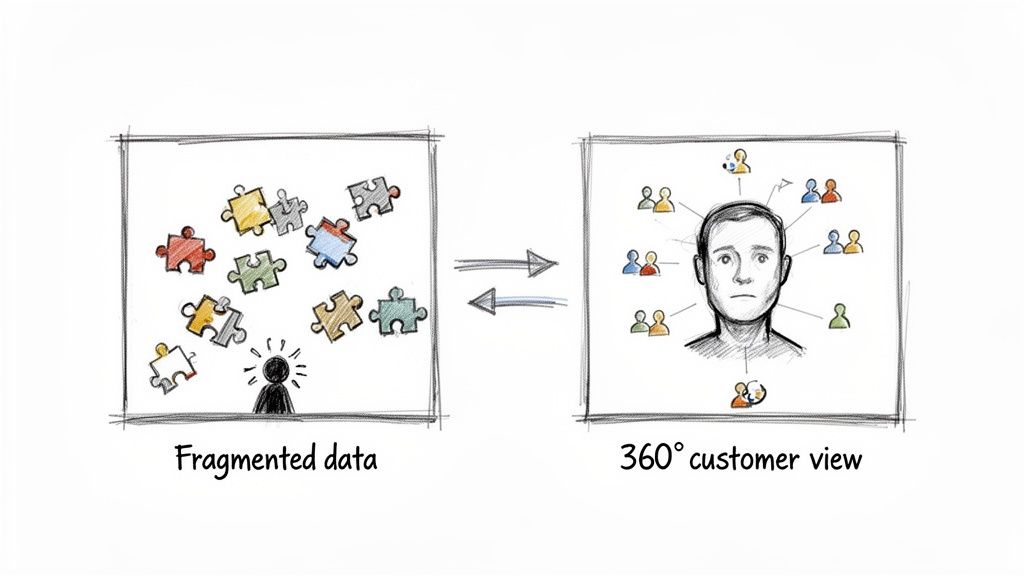
Disconnected data hits you where it hurts—right in the bottom line. It’s the hidden culprit behind so many of the operational struggles that teams face every day.
Practical Example: Think about an e-commerce store that can’t connect a customer’s recent support ticket about a delivery problem with their browsing history. The marketing system, completely unaware, might send them a promo email for the very same product they're frustrated with. An interaction like that doesn't just look sloppy; it actively erodes trust.
Another Example: Consider a SaaS company where product usage data is completely separate from the CRM. The account managers are flying blind, unable to spot users whose engagement is dropping off a cliff. They miss every signal to step in and help, right before that customer churns for good. Without integration, they can't ask, "I see you haven't used our reporting feature yet, can I show you how it works?"
Customer data integration is the bridge that connects all this scattered information to create strong, profitable customer relationships. It's the essential work of gathering, cleaning, and linking data from every touchpoint to build a reliable 360-degree customer profile. This unified view isn't a "nice-to-have" anymore; it's a must-have for survival.
A unified customer profile lets you switch from reactively putting out fires to proactively building relationships. Every interaction becomes a chance to show your customer you know them and you care.
This fundamental shift gives every team in your company a massive advantage:
Ultimately, getting customer data integration right is the first step toward creating the seamless, context-aware experiences people now expect. It lays the groundwork for a business that's not just more efficient, but genuinely customer-first. To see how this unified data powers amazing support, check out what an omnichannel customer service platform makes possible.
If you want to build a house that lasts, you start with a solid foundation. The same goes for your customer data. Now that we've covered the why, let's dig into the what—the essential pillars that hold up any successful customer data integration strategy. Think of these as the non-negotiable building blocks for creating that single, reliable view of your customer that every team can actually trust and use.
The biggest hurdle for most companies? Data silos. It’s a problem that can stall even the most well-intentioned projects. One of the most critical best practices in modern customer data integration is simply breaking down these walls to create a true 360-degree customer view.
In fact, recent reports show that a staggering 54% of organizations point to fragmented data as their single biggest barrier to using customer insights effectively. That statistic alone shows why getting these principles right is so important.
Imagine this journey: a customer browses your website anonymously, signs up for your newsletter with their email, and a week later, chats with your support team using a different email address but the same phone number. To your disconnected systems, that could look like three different people.
Identity resolution is the process that stitches those scattered interactions into a single, coherent customer story.
It works by finding and matching key identifiers across all your different datasets. For instance, it can link an anonymous browser cookie to an email address the moment a user signs up. Then, it can connect that same email to a phone number from a support ticket. The result? A unified profile that shows you a customer's entire journey, not just a few random snapshots.
Identity resolution transforms your data from a collection of disconnected facts into a meaningful narrative. It's the difference between knowing what happened and understanding who it happened to.
Your customer data model is the blueprint for how you organize every piece of information you collect. A great model doesn't just store data; it makes it logical, easy to find, and ready for action. It’s built to answer questions like, "What are our customers' most important attributes?" and "How do we track their interactions over time?"
Building a model that can scale means thinking ahead. Instead of creating a rigid structure that shatters the moment you add a new marketing channel or product line, you need to build in flexibility from day one.
customer_id, email, first_name, and last_name. This becomes the stable foundation.product_viewed, cart_added, or ticket_created. This captures behavior over time.purchases table can link back to the customer_id.This layered approach ensures your model grows with your business, not against it. As you dive deeper into these concepts, you'll find more great tips in these 10 actionable data integration best practices.
Not all data needs to move at the speed of light. Deciding between real-time and batch integration is a crucial choice that directly impacts everything from your user experience to your operational efficiency.
Real-time integration processes data the instant it’s created. Practical Example: A support agent seeing a customer's latest purchase just seconds after they clicked "buy." This is perfect for time-sensitive interactions where having immediate context is everything.
On the other hand, batch integration gathers and processes data in chunks at scheduled intervals—maybe hourly or overnight. Practical Example: Syncing daily sales figures into a data warehouse to generate end-of-day reports for the management team. This is far more efficient for large volumes of non-urgent data.
To help you decide, here’s a quick comparison of the two approaches.
| Aspect | Real-Time Integration | Batch Integration |
|---|---|---|
| Speed | Instantaneous (milliseconds to seconds) | Delayed (scheduled intervals) |
| Use Cases | Fraud detection, live chat support, personalization | Data warehousing, nightly reports, payroll |
| Data Volume | Best for individual transactions or events | Ideal for large, bulk data transfers |
| System Load | Constant, low-level system activity | Periodic, high-intensity spikes in load |
| Cost | Generally higher due to constant processing | More cost-effective for large datasets |
Ultimately, most businesses need a mix of both. The key is to match the method to the specific business need.
If your software tools are different parts of a body, then APIs and webhooks are the nerves that let them all communicate.
An API (Application Programming Interface) acts like a messenger that lets one system request information from another on demand. Practical Example: Your CRM can use an API to ask your e-commerce platform for a customer's complete order history right when a sales rep opens their record. It’s a “pull” system.
A webhook is more like an automated alert. It pushes data from one system to another automatically when a specific event happens. Practical Example: When a customer submits a support ticket in Zendesk, a webhook can instantly send that ticket's details into your team's Slack channel. No one has to ask for it; the data just shows up.
Together, these two create a responsive, living network where data flows exactly where it needs to be, right when it's needed most.
Having all your customer data in one place is powerful, but that power is useless if the data itself can't be trusted. Think of your data as the foundation for your customer relationships. If that foundation is shaky, incomplete, or just plain wrong, everything you build on it will eventually start to crack.
This is where a disciplined approach to data quality, governance, and compliance comes in. It’s not just about dotting i's and crossing t's; it’s about turning abstract rules into a real business advantage. Trustworthy data is clean, compliant, and well-managed—it’s the bedrock of any great customer experience.
High-quality data is the fuel for personalization and operational efficiency. Without it, all your integration work is for nothing. You'll end up sending confusing messages and frustrating customers. Keeping your data in top shape is an ongoing effort that really boils down to three key activities.
As you pull in more and more data, it's easy to create a "data swamp"—a messy, disorganized mess where information is impossible to find, trust, or use. Data governance is the framework you build to prevent that chaos. It establishes clear rules of the road and accountability.
The goal is to define who can access what data, who is responsible for keeping it accurate, and how it can be used. A solid approach to data governance best practices is non-negotiable if you want your integrated customer data to be reliable. Actionable Step: Create a "data dictionary" document that defines each key data point (e.g., "Customer Lifetime Value is calculated as..."), lists the "owner" of that data (e.g., the Finance team), and specifies who is allowed to view or edit it.
Data governance isn't about locking data away. It’s about enabling responsible access. It gives your teams the confidence to actually use the data because they know it's accurate, secure, and compliant.
The image below lays out the core principles that guide effective data management, all centered around creating that complete customer profile.
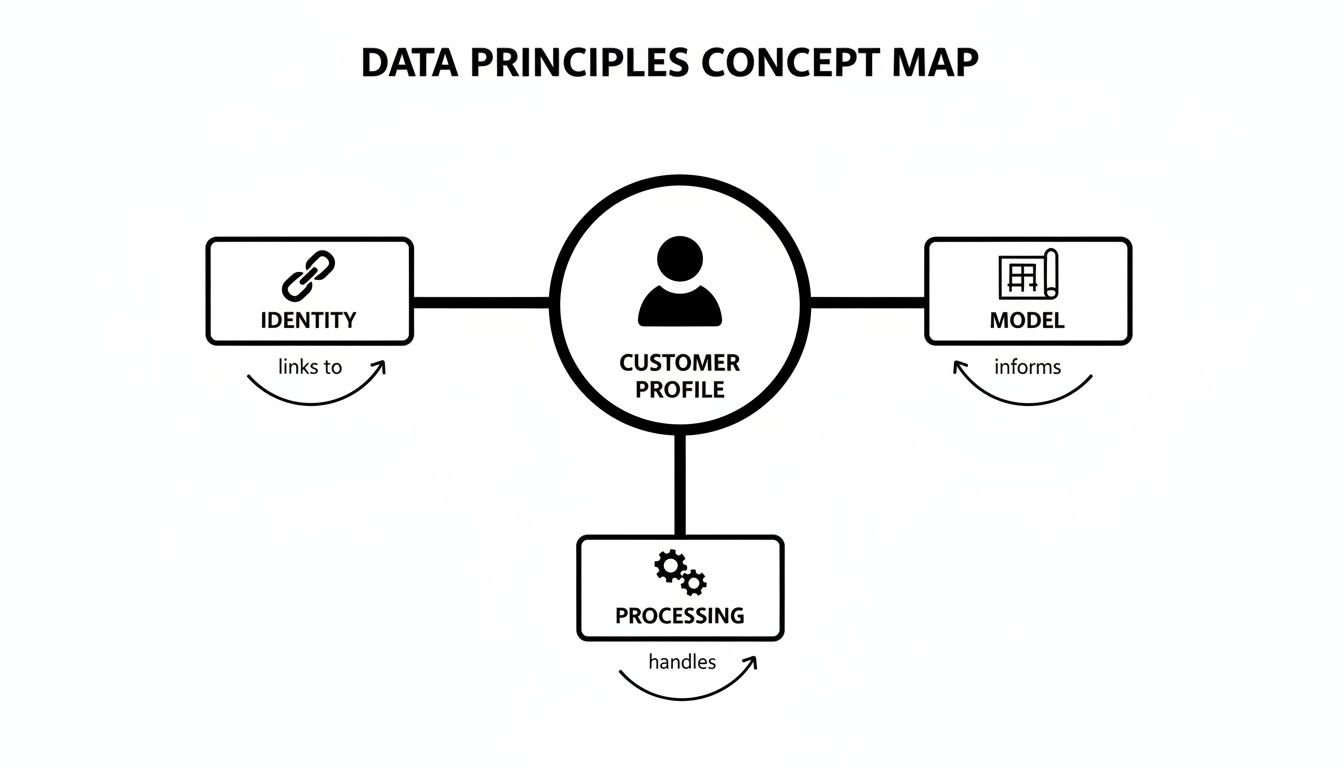
This map shows how a solid identity strategy, a clear data model, and well-defined processing rules all have to work together to produce a customer view you can actually rely on.
People are more aware of their data privacy than ever before. For businesses, this means compliance is no longer just a legal hurdle—it's one of the most powerful ways to build trust and earn loyalty. Regulations like GDPR in Europe and CCPA in California have set a new standard for how companies must handle personal information.
Don't look at these rules as a burden. Instead, see them as a playbook for treating customer data with the respect it deserves. A core tenet of modern customer data integration is building these privacy principles directly into your architecture from the very beginning.
This proactive approach means you’re always on the front foot by:
When you make compliance a cornerstone of your data strategy, you send a powerful message to your customers: we value you, we value your data, and we're committed to protecting it. That foundation of trust is your most valuable asset.
Turning strategy into a real-world, working system needs a clear, actionable playbook. A successful customer data integration project isn't magic; it’s the result of a deliberate, phased approach that gets your technology, people, and processes all pulling in the same direction. This plan will walk you through the steps to get from siloed systems to a unified customer data architecture without blowing up your day-to-day operations.
Think of it like building a bridge. You wouldn't just start pouring concrete without surveying the land, drawing up blueprints, and getting your crew together. It's the same with data integration—you have to understand the landscape and align your team before a single line of code is written or a new tool is purchased.
Before you can connect anything, you have to know what you’ve got. This first phase is all about discovery—mapping your current data ecosystem and making sure everyone is on the same page about what you're trying to achieve.
This groundwork ensures your integration efforts are tied directly to real business outcomes, which helps build momentum and get buy-in from the start.
Okay, you've got a map of your data and a clear set of goals. Now it's time to design the technical architecture that will bring it all to life. This is where you'll decide on the central hub for your customer data and pick the tools to connect everything.
A critical decision here is to make your CRM the central source of truth for all customer interactions. While other systems might be experts on specific things (like product usage or web analytics), your CRM should be the final word on the customer relationship itself. This simple-sounding decision dramatically simplifies your architecture and puts the most reliable information right in front of your customer-facing teams. Our guide on customer experience management tools can help you explore options that are built to serve as this central hub.
To actually connect your data sources to this hub, you’ll generally be looking at two types of tools:
The right choice really depends on your specific needs, the technical talent you have on hand, and how complex your current tech stack is.
Trying to migrate all your data in one big bang is a recipe for disaster. A phased approach is your best friend here—it minimizes risk and lets you show off some wins early on, which is key for keeping the project's momentum going. The secret is to prioritize the integrations that deliver the biggest impact with the least amount of heavy lifting.
A phased rollout isn't just a technical strategy; it's a political one. Securing a few quick wins by integrating high-impact systems first builds confidence and makes it easier to get resources for the more complex parts of the project down the road.
Start with your most critical connections. A proven best practice is to focus on your CRM first. It's shocking, but 25% of executives say their CRM lacks the integrations they need to get a full view of the customer. At the same time, 83% of organizations now call product integrations a top priority. The mandate is clear. Focusing on your CRM first directly tackles this problem and provides an immediate boost to sales and support. You can dive deeper into how integrations impact business goals in the full 2025-2026 integration statistics report.
Follow this structured migration plan:
Theory is one thing, but seeing how these ideas play out in the real world is where it all clicks. Let's move beyond the abstract and look at how different businesses are using smart data integration to solve nagging problems and build much better customer experiences. These examples show what happens when you connect the dots—you stop reacting to problems and start proactively creating solutions.
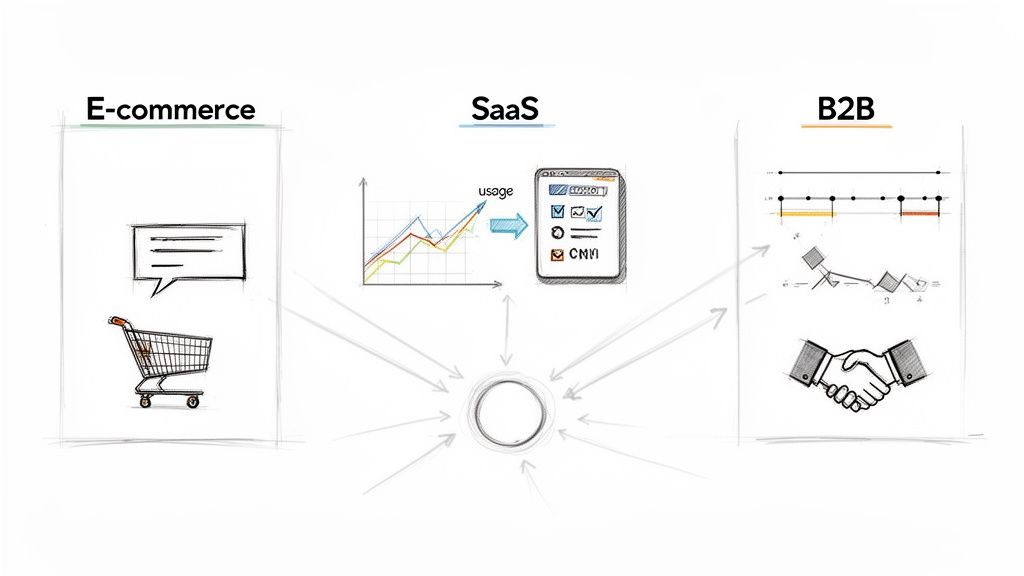
For each scenario, we'll break down the specific data sources they used, how they connected them, and the tangible results. This is where the idea of a "unified customer view" stops being a buzzword and starts becoming a genuine asset that drives revenue and builds loyalty.
The Problem: An online fashion retailer was watching sales slip through their fingers because of abandoned carts. Their generic "You left something behind!" emails were getting dismal open rates and even worse results. They knew they had to find a more personal, immediate way to bring shoppers back.
The Solution: They implemented a real-time integration connecting their Shopify store directly to their omnichannel support platform, which had WhatsApp messaging built-in.
The Problem: A fast-growing SaaS company was battling high user churn within the first 30 days. Their one-size-fits-all email onboarding sequence simply wasn't connecting with users who had vastly different goals and comfort levels with the software. They needed to offer guidance based on what people were actually doing in the product.
The Solution: They integrated their product analytics platform with their CRM, creating a powerful feedback loop between user behavior and customer communication.
By connecting what users do inside the product with what your team says to them, you can guide them toward their "aha!" moment much faster. This is a core customer data integration best practice for reducing early-stage churn.
feature_activated or project_created) and Salesforce (for account details and subscription levels).The Problem: A B2B financial services firm built its reputation on white-glove service, but its account managers were drowning in data chaos. Before every client call, they were forced to manually check three different systems: the CRM for deal history, the support desk for open tickets, and a billing portal for payment status. Important context was constantly getting lost in the shuffle.
The Solution: The mission was to give every account manager a complete client relationship timeline in a single screen, arming them with the full story before they ever picked up the phone.
These examples show the power of getting the fundamentals right, but the next frontier is even more exciting. By 2025, AI is expected to power 95% of all customer interactions, promising huge gains in satisfaction. But there’s a catch: 95% of IT leaders say that integration is the biggest roadblock to adopting AI. This highlights just how critical it is to build workflows that can bring data together from every channel. You can find more on this in a great report about the future of AI in customer engagement.
So, you’ve done the hard work of integrating your customer data. Now what? An integration project is only a true success if you can point to the business value it creates. To justify the time and resources you spent, you need to track the key performance indicators (KPIs) that actually move the needle for your company.
This isn't just about proving ROI; it’s about creating a feedback loop to keep refining your strategy.
Your best friend here is a simple, focused dashboard. Don't fall into the trap of tracking every metric under the sun. Instead, pick a handful of high-impact KPIs that directly tie back to your original goals. This gives stakeholders a clear, at-a-glance view of the value you're delivering.
Here are a few essential KPIs to start with:
For more ideas on what to track, our guide on measuring customer service performance can help you pinpoint the right metrics for your business.
Looking ahead, you can't talk about data integration without talking about artificial intelligence. AI and machine learning are poised to handle the most difficult parts of unifying data and will open the door to predictive insights we could only dream of a few years ago.
Customer data integration isn't a one-and-done project—it's a continuous journey. Think of AI as the co-pilot that helps you navigate that journey, turning your historical data into a roadmap for what customers will need next.
Soon, AI will take over tedious tasks like schema mapping and identity resolution, dramatically cutting down the manual work needed to plug in a new data source. Even more exciting, machine learning models will be able to comb through unified profiles to predict future behavior. Practical Example: An AI could analyze thousands of customer profiles and identify a pattern: customers who use Feature A but not Feature B within their first week are 80% more likely to churn. This insight allows you to proactively create an automated email campaign to guide those specific users toward Feature B.
This changes everything. We're moving from a world of reacting to customer actions to one where we can proactively anticipate their needs. Ultimately, a solid customer data integration strategy is the foundation for building profitable, long-term relationships. It's the engine that powers every personalized interaction, ensuring your business stays nimble and customer-obsessed for years to come.
Got questions about customer data integration? You're not alone. Here are the answers to some of the most common ones we hear.
Think of it as piecing together a puzzle. Your customer data is scattered across different systems—your CRM, support desk, marketing tools, e-commerce platform. Each system holds a different piece of the story.
Customer data integration is the process of bringing all those pieces together. It's about combining, cleaning, and matching that information to create a single, complete, and reliable profile for every customer. The end goal isn't just to move data around; it's to build one coherent, accurate story for every person you do business with.
You don't need a massive team or a six-figure budget to get going. The key is to start small and prove the value quickly. Pick just one integration that will make the biggest immediate impact.
One of the smartest first moves is connecting your main CRM with your customer support platform. This simple connection gives your support agents instant access to a customer's history, letting them solve problems faster and without asking a dozen repetitive questions. It’s a quick win that makes life better for both your team and your customers.
Actionable Insight: Look for native integrations first. Many SaaS tools (like Salesforce and Zendesk) have built-in connectors that can be set up in minutes with no code required. This is the lowest-cost, lowest-effort way to get your first win.
When your data is siloed, your customers feel it. They have to repeat their story to every new person they talk to. They get marketing emails for products they just complained about. They deal with support agents who have no idea what they've already been through. It's frustrating and it kills loyalty.
Integrated data is the backbone of any great customer experience today. It lets you understand what a customer needs, often before they even ask. Practical Example: If your e-commerce platform tells your CRM that a customer just spent $500, an automated rule can add them to a "VIP" segment. The next time they contact support, their ticket is automatically prioritized. That’s the kind of thoughtful, proactive service that turns a regular transaction into a lasting relationship.
Ready to see what a truly unified customer view can do? MagicalCX uses conversational memory and integrated profiles to create context-aware, human-like support experiences. Find out how our AI platform can transform your support center into a revenue driver by visiting https://www.magicalcx.com.