See your AI teammate in action now
Ready to make support faster, kinder, easier and help customers feel good about choosing you?
PS: Sales improves too...
No credit card required
14 days free trial
DIY or Guided setup
Ready to make support faster, kinder, easier and help customers feel good about choosing you?
PS: Sales improves too...
No credit card required
14 days free trial
DIY or Guided setup
A guide to help desk automation, covering ticket routing, chatbots, self-service portals, workflow automation, omnichannel support, KPIs, and rollout steps.
Manish Keswani
Summary by MagicalCX AI
Help desk automation can resolve up to 65% of support issues without human involvement and cut high-volume workflows like returns from 24 hours to under five minutes, freeing agents to focus on complex, high-empathy cases.
Help desk automation uses smart software to handle the repetitive, everyday tasks that clog up your support queue. This isn't about replacing your agents; it's about empowering them with practical tools so they can focus on the complex issues that genuinely need a human touch.
Think of your support team as a busy kitchen crew. Without automation, it's like having one chef do everything: take orders, chop the vegetables, cook every dish, and even run the credit cards. It’s a recipe for disaster. Orders pile up, quality drops, and everyone—from the chef to the customers—ends up frustrated.
That’s the exact situation many support teams find themselves in. They're drowning in tickets for password resets and order status updates while customers expect instant, round-the-clock help. Simply hiring more people isn't a sustainable answer; it just leads to agent burnout and a choppy customer experience.
Help desk automation is like giving that kitchen a modern upgrade. Suddenly, you have a digital system for taking orders, a food processor for all the chopping, and a self-serve kiosk for payments. The chef is finally free to do what they do best: create incredible meals.
In a support context, this translates into actionable solutions:
This isn’t just a minor tweak; it’s a fundamental change in how support operates. It turns your support team from a reactive "firefighting" department into a proactive, efficient engine for customer happiness. By letting automation handle the predictable, high-volume work, your agents can apply their skills where they count—solving tough problems and building real relationships.
You can learn more about how this technology drives business results in our guide on unlocking growth with AI customer service solutions.
The table below breaks down just how different these two approaches are.
| Feature | Manual Help Desk | Automated Help Desk |
|---|---|---|
| Ticket Handling | Agents manually sort, categorize, and assign every ticket. | Tickets are automatically categorized and routed to the right team or agent. |
| First Response Time | Hours or days, dependent on agent availability and workload. | Instant for common queries; significantly faster for complex issues. |
| Agent Focus | Repetitive tasks like password resets, order status, and FAQs. | Complex problem-solving, high-value customer interactions, and escalations. |
| Availability | Limited to agent work hours (e.g., 9-to-5). | 24/7/365 through self-service and chatbots. |
| Scalability | Expensive and slow; requires hiring and training more agents. | Scales instantly to handle spikes in volume without additional staff. |
| Cost Per Interaction | High, as every interaction requires a paid agent's time. | Significantly lower, as automation handles the bulk of simple requests. |
As you can see, the operational and financial benefits of moving to an automated system are hard to ignore.
This shift is more than just a passing trend—it’s a massive market movement. The global helpdesk automation market is expected to rocket from USD 8.23 billion in 2025 to an incredible USD 40.76 billion by 2031. That's a compound annual growth rate of 30.56%.
This explosive growth is being driven by businesses in e-commerce, SaaS, and direct-to-consumer who are scrambling to keep up with customer demand. You can read the full research on helpdesk automation industry trends to see what's behind the numbers.
The bottom line is that help desk automation isn't some far-off concept for the future. It’s about what it takes to stay competitive and keep your customers happy right now.
To really get what help desk automation is all about, you have to look under the hood. These aren't just trendy terms; they're the actual gears and pulleys of a system built to solve problems faster and give your team their time back. Think of it less like a single tool and more like a smart, interconnected assembly line for customer support.
Instead of one person manually handling every single step of a request, specialized automation components jump in to handle specific tasks with incredible speed and accuracy. Each piece has its own job, but they all work in concert to create a smooth, efficient experience for both your customers and your agents.
This diagram perfectly illustrates the journey from a purely manual help desk to a model where agents are empowered by automation.
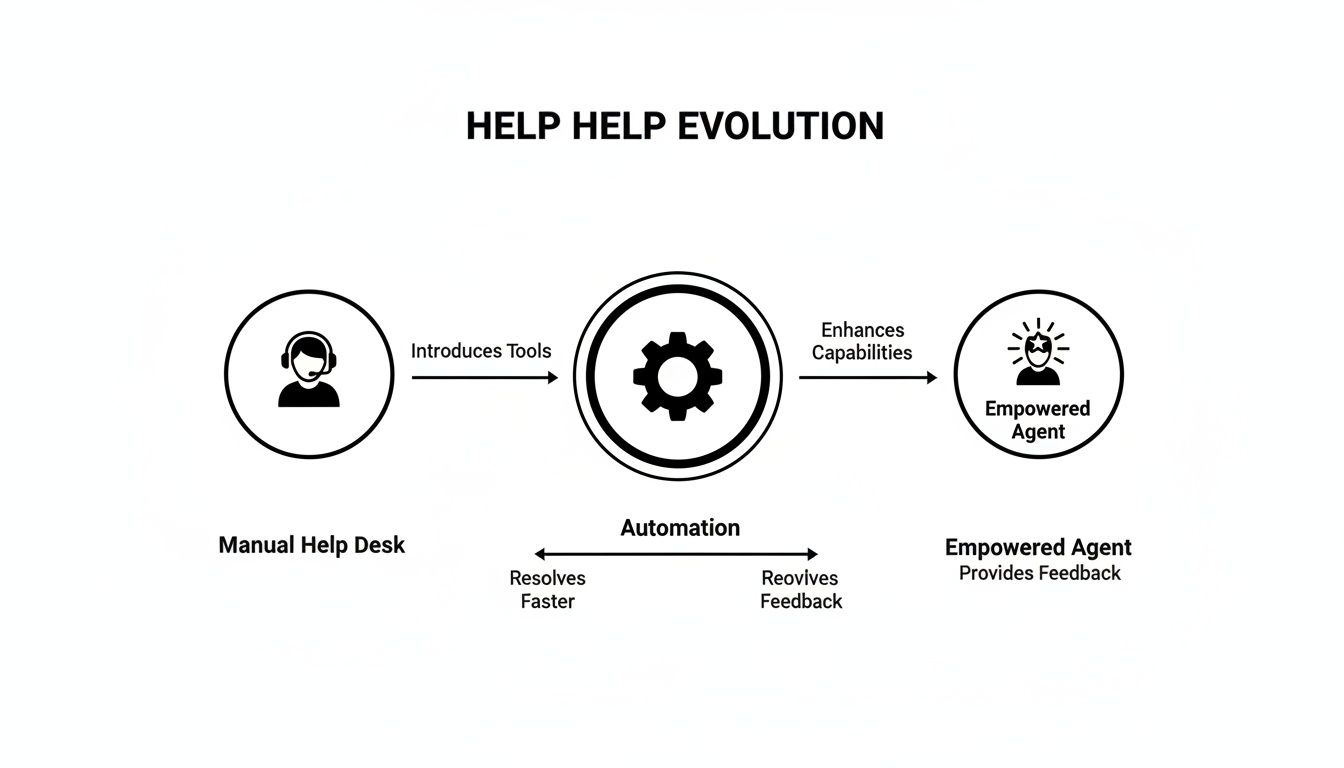
The big takeaway here is that automation doesn't replace agents. It elevates them, transforming their role from manual problem-solvers into high-value, strategic experts.
At its most fundamental level, automation brings order to the chaos of a busy inbox. Picture a customer email landing in a shared inbox. Manually, an agent has to open it, figure out what it's about, and then forward it to the right person or department. That process is slow and full of bottlenecks.
Automated ticket routing gets rid of that manual sorting. The system uses keywords, sender details, or even the emotional tone of the message to instantly categorize the ticket and assign it to the right person.
This simple change ensures the right expert sees the problem first, which drastically cuts down on internal back-and-forth and, most importantly, customer wait times.
Let's be clear: modern chatbots are light-years beyond the clunky FAQ bots of the past. Powered by conversational AI, they understand intent, not just keywords. This means they can manage complex, back-and-forth conversations and actually resolve issues that used to demand a human agent.
These AI systems plug directly into your knowledge base and other business tools to provide instant, accurate answers 24/7. They can troubleshoot problems, offer personalized guidance, and gather all the necessary info before an issue ever needs to land on a human agent's desk.
Some customer requests aren't just simple questions; they're multi-step processes. Think about handling a product return, onboarding a new user, or changing a subscription. Workflow automation is designed to guide customers through these journeys without an agent having to micromanage every step.
These automated workflows act like a digital guide, presenting the customer with the right information and options at precisely the right time. They collect details and trigger actions in other systems automatically.
This whole process can happen in just a few minutes, at any time of day, without a single human touchpoint. To get a better sense of how to build these kinds of seamless experiences, it's worth exploring the right customer experience management tools.
Finally, let's face it: your customers don't stick to one channel. They might send a tweet, follow up with an email, and then jump on your website's live chat. Omnichannel orchestration is the technology that makes sure this experience feels connected and seamless, not disjointed.
It works by unifying all of these different interactions into a single, continuous conversation thread for each customer. An agent who picks up an email can see the entire history of that person's recent chat, which kills the dreaded "can you tell me what happened again?" moment. Context is never lost.
Thinking about help desk automation purely as a tech upgrade is missing the bigger picture. It's a strategic business move, one with a very real and measurable return on investment (ROI). The true value isn't found in a list of features, but in the tangible results that hit your bottom line. We're talking about slashed first-response times, a serious drop in operational costs, and a massive lift in first-contact resolution.
But this isn't just about trimming the budget. It’s about a fundamental shift in how you view your support team—from a necessary cost center to a legitimate revenue driver. When automation takes over the predictable, high-volume questions, your human agents are freed up to handle the high-value work that a machine simply can't.
Suddenly, their time is spent retaining at-risk customers, solving complex problems before they escalate, and spotting organic opportunities to upsell. Your team is no longer just closing tickets; they're actively building loyalty and increasing customer lifetime value.
The financial argument for automation is incredibly strong. Every time a customer resolves an issue through a self-service portal or a chatbot, you've lowered your cost per interaction. It’s this kind of operational efficiency that's fueling the market's explosive growth.
In fact, the demand for this efficiency is so high that the helpdesk automation market is projected to grow at a compound annual rate of 26.1% from 2025 to 2031. This isn't surprising. Businesses are under pressure to cut costs while also meeting sky-high customer expectations for instant, 24/7 service. You can discover more insights about the helpdesk automation market and see how companies in retail, telecom, and even government are using it to manage a flood of tickets without hiring more people.
Let's look at how this plays out with practical examples:
These examples make it clear: the ROI isn't just about saving money on agent salaries. It's about creating smarter, more efficient systems that scale with your business and deliver a better customer experience.
To get buy-in for this kind of investment, you need to speak the language of business results. That means focusing on clear, quantifiable metrics that show the real-world impact of help desk automation.
Here are the key performance indicators (KPIs) to track that will build your business case:
By focusing on these numbers, you can build a data-backed argument that proves automation isn't just an operational nice-to-have—it's a critical investment for growth. For more strategies on this topic, check out our guide on how to reduce customer service costs while actually improving quality.
Theory is great, but seeing help desk automation work in the real world is what really makes the lightbulb go on. Let’s walk through a few mini-case studies from different industries to make these concepts more concrete. Each one breaks down a common, costly problem and shows how automation solved it—looking at the challenge, the fix, and the results.
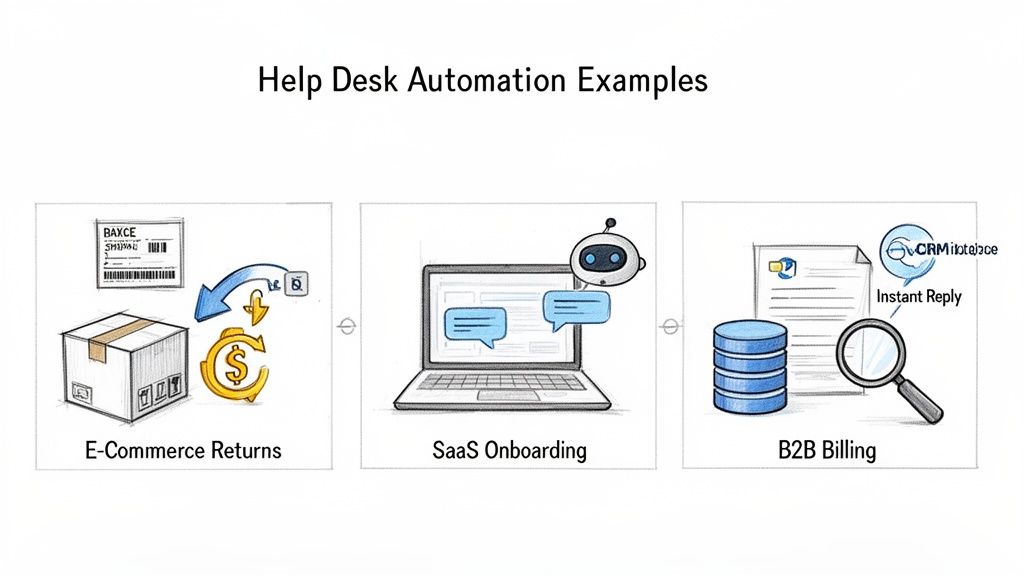
These examples show how automation is more than just a fancy way to route tickets. It becomes a central part of the customer journey, making a real difference in efficiency, happiness, and even revenue.
An online clothing store was getting buried under return and exchange requests, especially after a big sale. Their support team was spending all day manually answering tickets like "Where's my refund?" and "I need a different size." It was a slow, frustrating experience for customers and a huge cost for the business, tying up agents who could have been helping people make new purchases.
So, the brand built an automated workflow that customers could access right from their website's help center or chatbot.
A fast-growing SaaS company spotted a worrying trend: lots of new users would sign up for a free trial but never finish the basic setup. Their support queues were clogged with simple "How do I...?" questions about getting started, which led to poor activation rates and a lot of early churn. They couldn't afford to hire a huge onboarding team, so they needed a smarter way to guide new users.
Their solution was to deploy a conversational AI chatbot right inside their app's dashboard.
Finally, let's look at a B2B service provider that handles complex contracts and invoicing. Their account managers were losing hours every week digging through the CRM and billing system to answer routine questions like, "Can you resend last month's invoice?" or "What's the status of payment #7892?" This admin drudgery was pulling them away from what they were actually paid to do: build client relationships and find upsell opportunities.
The company automated this entire back-and-forth by connecting their help desk to their CRM and financial software.
Moving to an automated help desk can feel like a massive undertaking, but with a structured approach, it becomes a series of smart, manageable steps. Forget the idea of a giant, risky overhaul. Think of this as your playbook for a smooth rollout that delivers value right away and sets you up for future growth.
The secret is to start by understanding your current pain points and build from there. So many companies make the mistake of jumping straight to complex workflows without laying the groundwork. A methodical process, on the other hand, helps you score early wins, prove the ROI, and build momentum for the long haul.
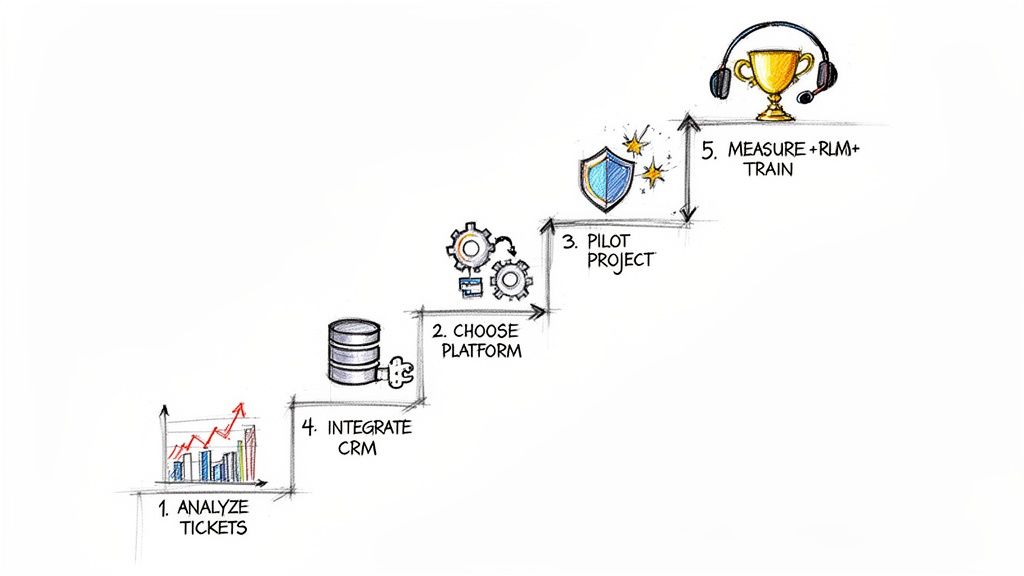
This journey doesn't begin with shiny new tech—it starts with data. Your existing support tickets are a goldmine of insights, pointing you directly to where automation will make the biggest difference.
Before you even glance at a vendor website, you need a clear target. The best place to find one is buried in your existing ticket data. Dive into your help desk analytics and hunt for the most frequent, repetitive, and time-sucking queries your team handles day in and day out.
Actionable Step: For the next two weeks, have your agents apply tags to every ticket. Common tags might be password-reset, order-status, billing-question, or feature-request. At the end of the two weeks, run a report to see which tag appears most often. That's your first automation target.
You'll likely see a lot of the same questions popping up again and again:
This simple exercise often reveals patterns you never knew existed. The goal here is to find the low-hanging fruit—those simple, high-volume tasks that are quietly draining your team's focus and energy.
Once you have your top automation targets locked in, it’s time to start looking at platforms. But remember, the "right" tool isn't just about a long list of features; it's about finding the right fit for your team and your existing systems.
As you evaluate your options, zero in on a platform that delivers on:
Whatever you do, don't try to automate everything at once. Pick one simple, high-impact process for a pilot project. Automating password resets is a classic for a reason: it’s a high-frequency, low-complexity task that delivers a clear and immediate win.
A successful pilot project is incredibly powerful. It accomplishes three things at once:
Actionable Step: Launch your pilot to a small segment of customers first, perhaps only those who contact you via a specific channel (like your website's chat widget). This lets you work out any kinks before rolling it out to everyone.
With a successful pilot in the bag, it's time to expand your efforts. This phase is all about weaving the automation platform more deeply into your existing tech stack. For example, connecting it to your CRM allows an automated workflow to instantly pull a customer's entire order history, providing context without any human intervention.
This creates a smooth, uninterrupted flow of information that empowers both your automated systems and your human agents. As you roll out new workflows, be sure to provide comprehensive training for your support team. Actionable Step: Create a short "cheat sheet" that outlines the top 3-5 new automated workflows. For each one, explain what it does, when it triggers, and how an agent should handle a situation if the automation needs to escalate to them.
Automation is never a "set it and forget it" project. To get the best possible results, you have to constantly monitor performance and make data-driven adjustments. That's why it's so important to define your key performance indicators (KPIs) from the very beginning, giving you a clear benchmark for success.
Regularly review your analytics dashboard to answer critical questions:
Actionable Step: Schedule a 30-minute review of your automation KPIs every two weeks. Look for one specific workflow that is underperforming (e.g., a chatbot conversation with a high drop-off rate) and make one small tweak to improve it before the next meeting. This creates a cycle of continuous improvement.
Adopting any new technology brings up a lot of questions, and help desk automation is no exception. It’s only natural to wonder about the real-world impact on your team, the costs involved, and what it truly takes to get it right.
Let's cut through the noise and tackle the most common questions and concerns we hear from leaders just like you. Think of this as your final checklist—a way to clarify the practical details before you move forward.
This is usually the first question on everyone's mind, and the answer is a firm no. The goal of automation isn't to replace your agents; it's to empower them. It’s about letting them offload the repetitive, low-impact tasks so they can focus on the complex, high-empathy work where their skills really make a difference.
Practical Example: Automation handles the 100+ "password reset" tickets you get every day. This frees up your Tier 1 agents to learn more advanced troubleshooting skills, creating a clear career path for them within the company and reducing agent turnover. It turns a dead-end role into a launchpad.
The price tag for help desk automation can vary quite a bit, depending on the platform you choose, the size of your operation, and how complex your workflows are. But framing it as a "cost" is the wrong way to look at it. It's an investment, and the real question is about the return.
When you start digging into the numbers, the business case becomes clear:
When you add up these savings, the initial investment often pays for itself surprisingly quickly. Your support center stops being a cost center and starts becoming a powerhouse of efficiency.
The key is to start small and scale smart. A "big bang" approach where you try to automate everything at once is a recipe for chaos and disruption. Instead, aim for a phased rollout that focuses on quick wins to build momentum.
Actionable Insight: Your existing support tickets are a goldmine of data. Dig in and find the single most frequent, repetitive question your team answers all day. Automating just that one process gives your agents immediate relief and delivers a measurable result with very little risk.
For example, a classic pilot project is automating "Where is my order?" inquiries. It's high-volume, low-complexity, and a perfect first step. Once you nail that, you’ll have proven the value to your team and stakeholders, making it much easier to get their buy-in for bigger projects down the road.
Let's be realistic: while today's AI is incredibly powerful, it isn't magic. Automation is brilliant at handling structured, predictable problems. It can walk a customer through a multi-step return process or provide an account balance in a split second.
But it’s not meant for emotionally charged conversations, nuanced technical problems, or unique situations that require human creativity. That’s where a seamless handoff to a human agent becomes absolutely critical.
Practical Example: A chatbot tries to help a user with a billing issue, but the user's messages contain words like "frustrated" and "unacceptable." A well-designed system detects this negative sentiment, immediately stops the automated flow, and says, "I understand this is frustrating. Let me connect you with one of our billing specialists right now." It then transfers the full conversation history to an agent.
First-contact resolution (FCR) is the holy grail for any support team, and automation gives it a massive boost. Recent data from Forrester is eye-opening: organizations using AI virtual agents are now resolving an incredible 65% of issues without any human help at all. This completely changes the game, driving productivity gains of over 50% for agents who then use smart tools like chat summarization for the remaining issues. You can discover more insights about these helpdesk trends and see the impact for yourself.
Automation improves FCR in two main ways:
By getting the right information to the right person (or letting the customer find it themselves), automation cuts down on the frustrating back-and-forth that tanks FCR rates.
Ready to transform your customer support from a cost center into a revenue driver? MagicalCX uses empathy-first AI to automate complex journeys, provide human-like answers, and empower your team to focus on what matters most. Discover how MagicalCX can help you scale support and delight customers.


