See your AI teammate in action now
Ready to make support faster, kinder, easier and help customers feel good about choosing you?
PS: Sales improves too...
No credit card required
14 days free trial
DIY or Guided setup
Ready to make support faster, kinder, easier and help customers feel good about choosing you?
PS: Sales improves too...
No credit card required
14 days free trial
DIY or Guided setup
Manish Keswani
In the world of customer service, one of the most fundamental metrics you'll hear about is Average Handle Time, or AHT. So, what is it exactly? Simply put, AHT measures the entire average length of a customer interaction, from the moment an agent picks up until they're ready for the next one.
It's not just about the time spent talking. AHT covers every single second of the process, including any time the customer is on hold and all the administrative tasks an agent has to wrap up afterward. For example, if an agent spends 4 minutes talking to a customer, 1 minute on hold looking up an order, and 2 minutes writing notes after the call, the total handle time for that interaction is 7 minutes. While a typical AHT across many industries hovers around six minutes, this figure can swing wildly depending on how complex your customers' issues are.
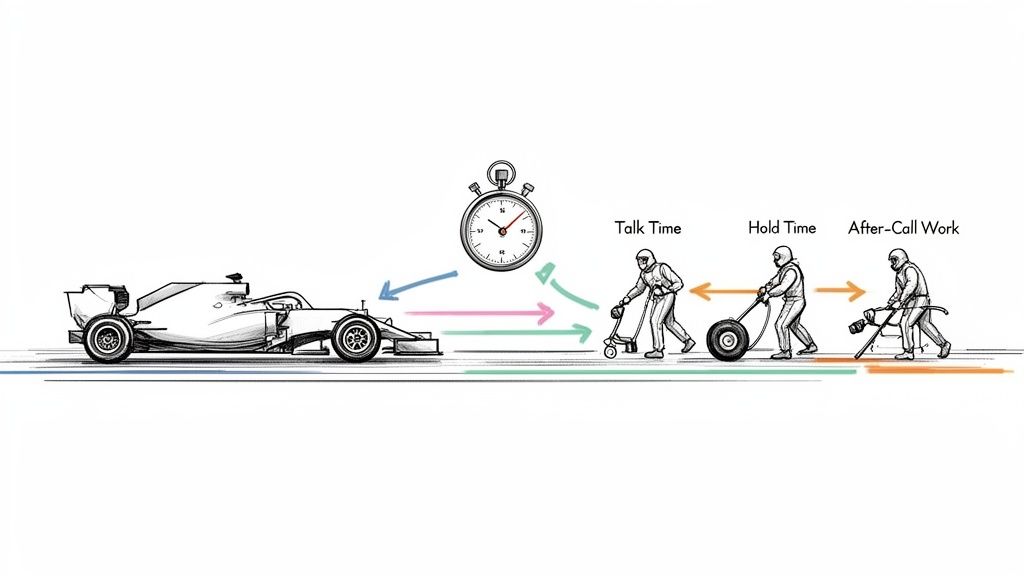
Think of your support team like a Formula 1 pit crew. The goal of a pit stop isn't just to be the fastest—it's to perform a flawless, efficient service that gets the car back in the race safely. A rushed job that leaves a tire loose is a catastrophe. Similarly, rushing a customer off the phone without actually solving their problem creates more work down the road and a terrible experience.
This is why AHT is such a powerful metric. It gives you a clear window into the health of your entire support operation, showing how well your team balances speed with quality. When you understand AHT, you get a direct look at your team's efficiency, your operational costs, and the kind of experience you're delivering to your customers. For instance, a sudden spike in AHT could indicate a new product issue that agents are struggling to diagnose, giving you an early warning sign.
To really understand what's driving your AHT, you have to break it down into its three distinct parts. Each piece of the puzzle tells a different story about your team’s performance and where they might be running into roadblocks.
The table below breaks down these three critical elements.
| Component | Description | Practical Example & Actionable Insight |
|---|---|---|
| Total Talk Time | The actual time an agent spends actively speaking with a customer. | Example: A new agent's talk time is 25% higher than the team average for the same issue type. Insight: This isn't a problem to be punished; it's a coaching opportunity. The agent may need more product training or practice in guiding a conversation efficiently. |
| Total Hold Time | The cumulative time a customer is put on hold during an interaction. | Example: Hold times spike whenever a new marketing promotion is launched. Insight: The support team lacks quick access to promotion details. Proactively add a one-page summary of all new promotions to your internal knowledge base before they go live. |
| Total After-Call Work (ACW) | Often called "wrap-up time," this includes every task an agent does after the call ends: logging notes, updating the CRM, sending follow-ups, etc. | Example: Agents are spending over three minutes per call updating customer addresses in three different systems. Insight: Your software is creating a bottleneck. Invest in a CRM integration that syncs customer data automatically, eliminating redundant manual entry. |
Looking at AHT this way—as a sum of its parts—is far more insightful than just tracking a single number.
By dissecting Average Handle Time into talk, hold, and wrap-up, you stop guessing and start seeing exactly where your team’s time is spent. This is the only way to make smart, targeted improvements.
For instance, if your team has a short talk time but a really long After-Call Work time, the problem probably isn't the agents' communication skills. It's more likely that their software is slow or the wrap-up process is too complicated. This detailed view turns AHT from a simple metric into a practical roadmap for making things better. The goal isn't just to know how long an interaction takes, but to understand why it takes that long.
If you want to make any real improvements to your support efficiency, you have to start with an accurate Average Handle Time calculation. Without solid data, you're just guessing. The good news is that the standard formula is pretty straightforward, designed to capture the entire journey of a customer interaction.
At its core, the calculation is simple: you just add up all the time an agent spends actively working on customer issues and divide that by the total number of interactions they managed.
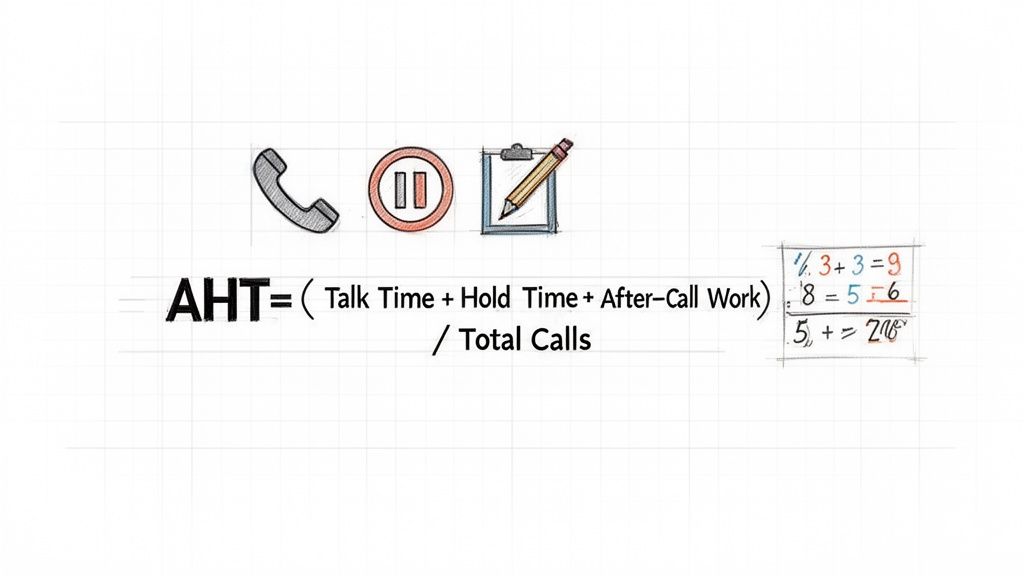
This formula makes sure you’re looking at the complete picture—not just the time spent talking to the customer.
The universally accepted formula for AHT looks like this:
AHT = (Total Talk Time + Total Hold Time + Total After-Call Work) / Total Number of Calls
Let's put this into a real-world context to see how it works.
Picture a retail support team swamped during the post-holiday returns rush. Over one shift, a team of five agents handled a total of 200 calls. Here’s a breakdown of their time:
Now, let's plug those numbers into our formula:
(1,200 minutes + 250 minutes + 350 minutes) / 200 calls = 9 minutes
So, the team’s AHT for that shift was 9 minutes. This single metric gives the contact center manager a concrete baseline for efficiency during a particularly demanding period. Of course, AHT is just one piece of the puzzle. It's always a good idea to explore other ways of measuring customer service to get a more holistic view.
Calculating AHT might seem easy, but there are a few common tripwires that can mess up your data and lead you down the wrong path. Bad data can make you chase problems that aren't real while completely missing the ones that are.
Keep an eye out for these potential traps:
Failing to Segment Data: This is a big one. Throwing all your interactions into one bucket is a huge mistake. The AHT for a complex billing dispute over the phone will always be longer than a simple password reset via chat. Actionable Tip: Create separate AHT reports for phone, chat, and email channels. Then, go a level deeper. Tag interactions by type (e.g., 'Billing Inquiry,' 'Technical Support,' 'Return Request') to identify which specific issues are taking the most time.
Excluding Certain Ticket Types: Some teams are tempted to remove unusually long or complicated calls from their AHT reports to make the average look better. Don't do it. This just paints a rosier, inaccurate picture. Actionable Tip: Instead of excluding outliers, analyze them. A single 45-minute call could reveal a major flaw in your product documentation or a gap in your agent training that, once fixed, could prevent dozens of similar long calls in the future.
Inconsistent ACW Tracking: After-Call Work is a notoriously tricky component to track. If your agents don't consistently switch out of their "wrap-up" status before jumping on the next call, your ACW times can get bloated and throw off the entire calculation. Actionable Tip: Standardize the process. Clearly define what tasks are included in ACW and train agents to always finalize their wrap-up status before becoming available. Run a weekly report on agents with the highest ACW to identify who might need a process refresher.
Steering clear of these mistakes will protect the integrity of your data. When you can trust your AHT numbers, you can make smarter, more confident decisions for your team and your customers.
If you’re chasing a single, universal target for Average Handle Time, you’re setting your team up for failure. It’s like telling a pit crew they have the same amount of time to change a tire as they do to rebuild an engine—it just doesn't make sense. The goal isn't to hit an arbitrary number; it's to find the sweet spot where efficiency meets genuine problem-solving.
Don’t fall into the trap of thinking a low AHT is always a good thing. It can be a massive red flag. When agents are pressured to rush, they start cutting corners. They might give incomplete answers or transfer tricky issues just to get a customer off the line, which only leads to frustrated repeat calls. This not only sours the customer relationship but actually costs you more in the long run.
A simple password reset is a world away from troubleshooting a complex software bug. The nature of your customer queries is the single biggest factor in determining what a "good" AHT looks like for your business, and your goals have to reflect that.
Look across different industries, and you’ll see just how much AHT can vary. Retail support might clock in around 3-4 minutes, while a technical support team could reasonably need 8-10 minutes. Healthcare often lands somewhere in between, around 6-8 minutes. These benchmarks are your starting point for setting realistic targets. They help you avoid the one-size-fits-all advice, like the blanket 8-minute rule some consultants push, which can cause serious headaches when applied incorrectly. For a deeper dive, check out these insights on how AHT benchmarks vary by industry on Zendesk.com.
The right AHT goal isn't the lowest number you can hit. It's the number that reflects your team efficiently and effectively solving your customers' specific problems.
Things like regulatory compliance can also add time to a call—and for good reason. An agent in finance or healthcare has to follow strict verification and disclosure scripts. Trying to shave a few seconds off AHT by skipping these steps isn't just bad practice; it’s a compliance nightmare waiting to happen.
Let's look at a real-world example. A fast-growing e-commerce company wanted to get its support costs under control. Leadership read an industry report and decided to roll out a company-wide AHT target of four minutes. This single goal was applied to everyone, from the team handling "Where's my order?" questions to the specialists dealing with complex international shipping disputes.
The outcome was a total mess.
It didn't take long for the leadership team to see their mistake. They scrapped the universal target and started setting different AHT goals based on the type of issue. The target for simple order questions stayed low, but the goal for logistics problems was bumped to a more reasonable eight minutes. This one simple change, rooted in context, turned their entire support operation around, restoring both agent morale and customer trust.
Instead of fixating on a single number, you need a more nuanced approach. The best place to start is with your own historical data. Dig in and start segmenting it by a few key variables.
Key Factors for Segmentation:
Actionable Tip: Create a simple matrix. For example, a "New Hire" handling a "Technical Support" call might have a target AHT of 12 minutes, while a "Senior Agent" handling a "Billing Question" might have a target of 5 minutes. This tiered approach is fairer to your team and gives you a much more accurate picture of performance.
When you break down your data this way, you can establish multiple, realistic AHT benchmarks. This transforms AHT from a metric that creates pressure into a powerful tool that actually helps you improve your processes and empower your agents to do their best work.
Okay, let's turn data into action. The goal here isn't to get agents to rush through calls—that's a recipe for disaster. The real aim is to make their jobs easier by removing the frustrating little roadblocks that waste time for everyone. Think of it less as a race against the clock and more as a project to streamline the entire support process.
When you focus on efficiency over pure speed, you empower your team to solve problems quickly and completely. AHT naturally drops as a side effect, and both your customers and agents are happier for it.
One of the biggest time-sinks on any call? The dreaded "let me put you on a brief hold while I find that for you." An agent scrambling for an answer is a classic AHT killer.
This is where a well-organized, searchable internal knowledge base becomes your secret weapon. It’s a central library for everything your team needs: product specs, troubleshooting guides, return policies, you name it.
Actionable Example: A customer calls about a specific error code on a new product. Instead of putting them on hold for five minutes to track down a senior agent, your rep simply types the code into the knowledge base. Instantly, a step-by-step troubleshooting article pops up. They can walk the customer through the fix in real time, cutting the handle time in half and looking like an expert in the process. Your action item: Identify the top 5 reasons customers are put on hold and create dedicated knowledge base articles for each one this month.
Is there anything more infuriating for a customer than being passed from one department to another, forced to repeat their story each time? This is where intelligent call routing comes in. It’s designed to get the customer to the right expert on the very first try.
Actionable Example: Using an IVR (Interactive Voice Response) system, you can ask customers to press '1' for billing or '2' for technical support. This simple step ensures a billing question goes straight to the billing team, and a technical issue gets routed directly to a Tier 2 specialist. This immediately improves First Contact Resolution and eliminates all the wasted time spent on transfers and re-explaining the problem. For a deeper dive, check out our guide on improving quality in your call center.
So much of an agent's time, especially in After-Call Work (ACW), is eaten up by repetitive administrative tasks. Think about processing a simple return, updating an address in the CRM, or sending a standard follow-up email. These are perfect candidates for automation.
Actionable Example: Create a macro or one-click automation for your most common requests, like a password reset. When an agent finishes the call, they can click a single button that automatically logs the call reason, closes the ticket, and sends a "Your password has been reset" email template. This can turn a 90-second manual process into a 2-second automated one.
The Big Idea: When you automate the routine, you free up your agents to focus on the things humans are great at—solving tricky problems, showing empathy, and building real customer relationships.
For instance, an automated workflow for a standard refund request can easily slash ACW by over 50%. The agent just confirms the details with the customer, clicks a button, and the system takes over—updating the CRM, triggering the refund, and sending the confirmation email. That’s a massive, immediate win for your AHT.
It's helpful to remember the ideal breakdown of a call: talk time should be around 65-75%, with hold time under 15-20% and wrap-up at 10-20%. When those numbers get out of whack—especially hold time, which frustrates 60% of customers in under two minutes—it’s a clear sign of inefficiency. You can discover more insights about AHT on voiso.com to see more 2025 call center stats. Striking this balance is key to avoiding rushed agents, repeat calls, and a nosedive in CSAT.
To put it all together, let’s look at the right way versus the wrong way to tackle AHT reduction. The smart approach is about empowerment and efficiency, while the counterproductive tactics create more problems than they solve.
| Smart Strategy | Counterproductive Tactic |
|---|---|
| Empower agents with a comprehensive, easy-to-search knowledge base. | Force agents to memorize massive scripts and policies, leading to errors. |
| Use intelligent routing to connect customers with the right expert immediately. | Use a basic "round-robin" system that leads to multiple transfers. |
| Automate repetitive tasks like data entry and follow-up emails. | Pressure agents to type faster and skip detailed note-taking. |
| Coach agents on efficient problem-solving and communication techniques. | Set strict, unrealistic time limits for every single call. |
| Analyze call recordings to identify and remove systemic roadblocks. | Punish agents for any call that goes over the target AHT. |
| Invest in integrated tools that reduce the need to switch between apps. | Tell agents to end calls quickly, even if the issue isn't fully resolved. |
Ultimately, the best strategies make the agent's job easier, not harder. When you focus on removing friction from their workflow, a lower AHT becomes the natural outcome of a better, more efficient customer experience.
Average Handle Time is a crucial metric, but treating it as the only metric is a classic and costly mistake. Viewing AHT in a vacuum gives you a dangerously incomplete picture. It doesn't tell a story on its own; it’s just one chapter in the larger saga of your customer experience.
When you chase a lower AHT at all costs, you often create a "seesaw effect"—pushing one metric down while another, far more important one, comes crashing up. Forcing agents to end conversations prematurely almost always leads to half-baked solutions, frustrated customers, and a surge in repeat contacts. That's why AHT must be analyzed as part of a balanced scorecard, right alongside metrics that measure quality and outcomes.
The relationship between Average Handle Time (AHT) and First Contact Resolution (FCR) is probably the most important one to monitor. FCR, of course, is the percentage of customer problems you solve in a single interaction. An obsessive focus on slashing AHT can be absolutely toxic to your FCR rate.
Practical Example: An agent is on a call that’s creeping up on the team's five-minute AHT target. To avoid getting flagged, they suggest a quick reboot as a fix, knowing it only works half the time. The call ends, the AHT looks great on a report, but the customer is forced to call back the next day when the problem returns. The FCR for that issue is now zero, and your company just paid for two interactions instead of one.
A low AHT paired with a low FCR is a massive red flag. It's a flashing neon sign that your team isn't actually solving problems, which drives up operational costs and pushes customers away.
Next, let's look at Customer Satisfaction (CSAT) and Net Promoter Score (NPS). These are your direct lines to how customers actually feel about your service. When agents feel pressured to rush, they might start cutting corners, sounding impatient, or failing to show empathy. All of those behaviors will absolutely crush your CSAT scores.
Put yourself in the customer's shoes for a second. Would you rather have a 4-minute call that leaves you feeling ignored with a lingering problem, or a 7-minute call where the agent is patient, thorough, and fixes everything? A slightly higher AHT combined with a stellar CSAT score is often the sign of a healthy, customer-first support operation.
The strategies that work best are the ones that make agents smarter, not just faster.
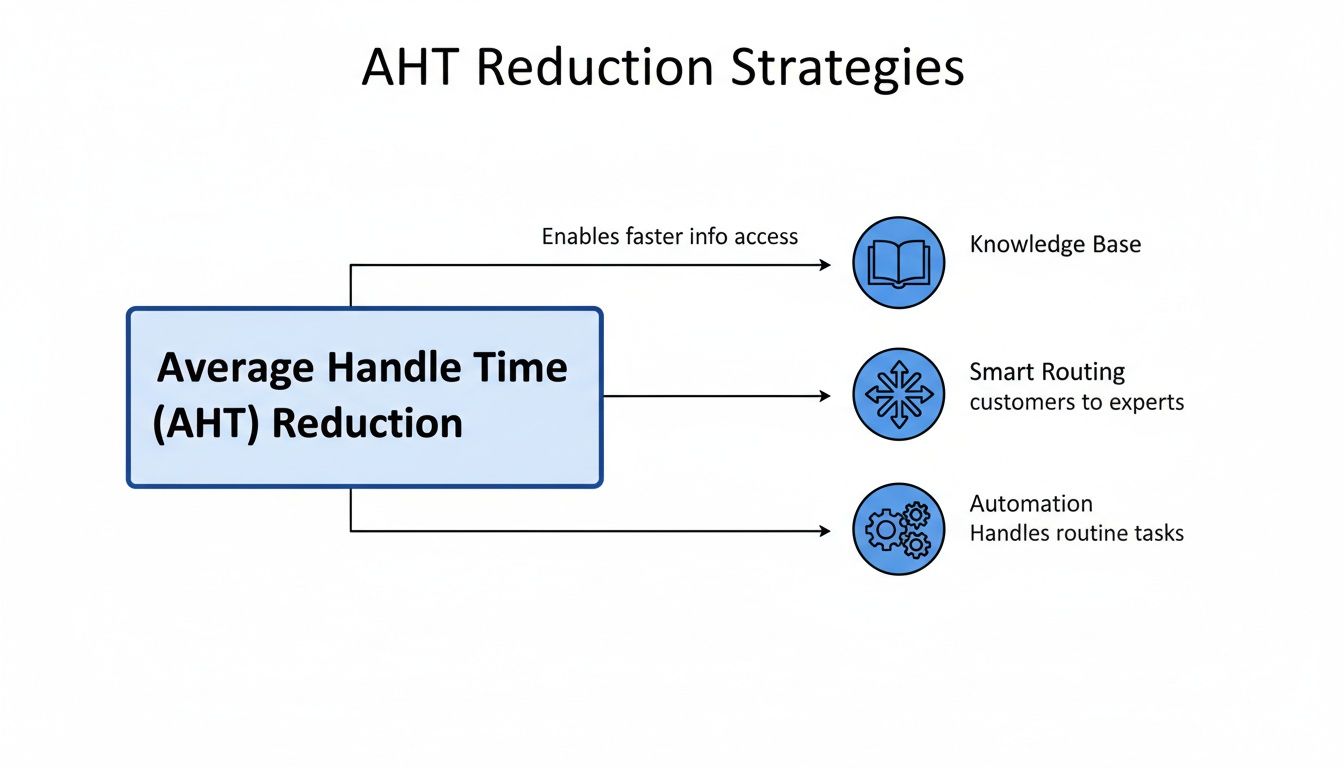
This shows how arming your team with a solid knowledge base, routing issues to the right expert, and automating repetitive tasks empowers them to solve problems more effectively, which naturally lowers handle time.
To get a true read on your team's performance, you need to see the whole picture. A balanced scorecard helps you understand the interplay between efficiency and quality.
Actionable Tip: Create a dashboard that displays AHT, FCR, and CSAT side-by-side for each agent. This visual comparison makes it easy to spot imbalances. An agent with low AHT but poor FCR/CSAT needs coaching on thoroughness, not speed. Conversely, an agent with high AHT but great FCR/CSAT might be a subject matter expert who can help train others.
While the global benchmark for average handle time hovers around 6 minutes and 10 seconds, that number is meaningless without context. This is especially true when you consider that over 60% of customers will hang up after just two minutes on hold, making the pressure to balance speed and quality immense. By monitoring these interconnected metrics together, you can make smarter decisions that improve both your operations and, most importantly, the customer experience. You can discover more insights about call center AHT on myaifrontdesk.com to dive deeper into industry trends.
All the strategies in the world are great, but putting them into practice is what really counts. This is where modern AI platforms come in. Instead of just pushing agents to work faster, tools like MagicalCX get to the root of what causes long handle times in the first place. It's not about cracking the whip; it's about making an agent's job fundamentally easier. When you do that, a lower AHT just naturally follows.
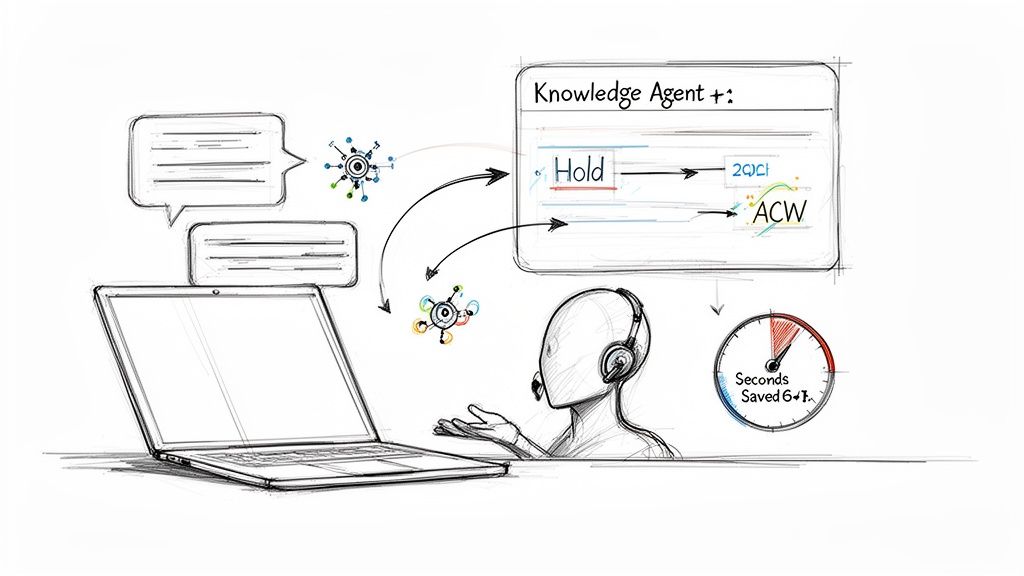
This is a real shift—moving from old-school manual work to smart, AI-driven assistance.
Think about one of the biggest time-sinks for any agent: hunting for information. A customer asks a tricky question, and the agent has to put them on hold while they scramble through a clunky internal wiki or tap a coworker on the shoulder. That dead air is a massive driver of high AHT and, frankly, it drives customers nuts.
Actionable Example: An AI-powered knowledge base can listen to the customer conversation in real-time. When the customer mentions "return policy for international orders," the AI automatically surfaces the exact policy on the agent's screen before they even have to ask. The agent can provide an instant answer without ever saying, "Please hold." This eliminates hold time and makes the agent appear incredibly knowledgeable.
After-Call Work (ACW) is the other silent killer of AHT. Manually typing up call summaries, updating CRM records, and sending follow-up emails can easily take as long as the conversation itself. All that admin time keeps agents tied up when they could be helping the next person in line.
Modern AI platforms can automate nearly all of these post-call chores. The system generates an accurate call summary, fills out the CRM fields automatically, and even sends a templated follow-up. This can cut ACW by over 70%, freeing up your team to do what they're actually there for: talking to customers.
Actionable Example: Imagine an agent just finished a call about a damaged shipment. With an AI tool, the moment the call ends, a pre-populated summary appears for their review. With one click, they confirm it, and the AI automatically updates the CRM ticket, drafts a follow-up email to the customer with a tracking number for the replacement, and logs the issue for the quality team. A 3-minute task is completed in 15 seconds.
Finally, AI helps by getting rid of all those repetitive, time-wasting questions that bog down the start of every call. Integrated platforms like MagicalCX give agents a complete picture of the customer—their buying history, previous support tickets, and any known issues—the second the call or chat begins.
Actionable Example: The classic identity verification dance. Instead of starting every call with, "Can you please confirm your name, email, and order number?" an AI-integrated system can use the incoming phone number to pull up the customer's entire profile instantly. The agent can greet them with, "Hi Sarah, I see you're calling about your recent order for the blue sweater. How can I help?" This alone can shave 30-45 seconds off every single call and provides a far more personal experience.
Knowing how to leverage this technology is central to successfully deploying AI customer service solutions. By giving agents immediate context, AI lets them skip the small talk and jump straight into solving the problem, which makes for a quicker and much more personal experience.
Once you get the hang of Average Handle Time, you'll find a few common questions always seem to surface. Let's tackle them head-on, because getting these answers right is key to using AHT effectively without accidentally making things worse for your customers or your team.
Everyone wants to know the magic number, but the truth is, a "good" AHT is completely relative. It depends entirely on your industry and the kind of problems your team is solving. The often-quoted cross-industry average is about six minutes, but that number can be seriously misleading.
Practical Example: A retail agent helping with a simple order status check might aim for a speedy 3-4 minutes. But a technical support specialist for a complex software product? Their AHT could easily be over 10 minutes, and that would be perfectly healthy because they’re doing deep-dive troubleshooting.
The real goal isn't to chase some universal benchmark. It's much smarter to compare yourself to similar companies in your space and, most importantly, watch your own internal trends. The golden rule is to make sure that any effort to lower your AHT doesn't end up tanking your customer satisfaction or First Contact Resolution rates.
After-Call Work (ACW), or "wrap-up time," is a huge piece of the AHT puzzle that often gets ignored. This is everything an agent has to do after the customer hangs up: typing up detailed notes, updating the CRM, sending a follow-up email, you name it.
Actionable Insight: If your ACW is high, it's a giant red flag that can seriously inflate your overall AHT. It usually points to clunky software or inefficient processes. When agents are spending minutes on post-call tasks, you've found a golden opportunity for improvement. Your first step: Survey your agents and ask them, "What is the single most time-consuming task you do after a call?" Their answers will point you directly to the biggest bottleneck you need to fix, whether it's through automation, better templates, or software integrations.
Absolutely, and it's a dangerous trap to fall into. When the only thing that matters is shaving seconds off the clock, agents start to do whatever it takes to make their numbers look good, and your customers are the ones who pay the price.
Practical Example: An agent, pressured by a strict 4-minute AHT target, might rush a customer off the phone, give a half-baked answer, or transfer a tough problem just to keep a long call off their stats. This behavior is a direct path to terrible customer satisfaction, plummeting First Contact Resolution (FCR) rates, and a spike in frustrated customers calling back.
Ironically, this obsessive focus on speed ends up costing you more in the long run and chips away at customer loyalty. AHT should never be the star of the show; it needs to be just one part of a balanced scorecard that includes quality metrics like CSAT and FCR.
Ready to stop guessing and start optimizing? MagicalCX uses an empathy-first AI to streamline workflows and automate after-call work, naturally reducing your Average Handle Time while improving customer satisfaction. See how it works at https://www.magicalcx.com.


